10 Spam Triggers to Avoid in B2B Cold Emails

Here’s the deal: spam filters are ruthless. They flag your emails for specific triggers - words, design, technical missteps - and even a single mistake can tank your deliverability. In B2B outreach, that means lost deals and wasted effort.
Key Takeaways:
- Avoid spammy phrases like "free money" or "act now." They scream scams.
- Skip clickbait subject lines - misleading hooks lead to spam complaints.
- Limit links, images, and heavy HTML. Keep it text-focused and simple.
- Authenticate your domain (SPF, DKIM, DMARC) and warm it up gradually.
- Personalize your emails. Generic templates get flagged and ignored.
- Clean your lists. High bounce rates from invalid addresses kill your sender reputation.
- Include unsubscribe links. It’s legally required and reduces spam reports.
- Keep it short and focused. Long, self-centered pitches don’t work.
Why This Matters:
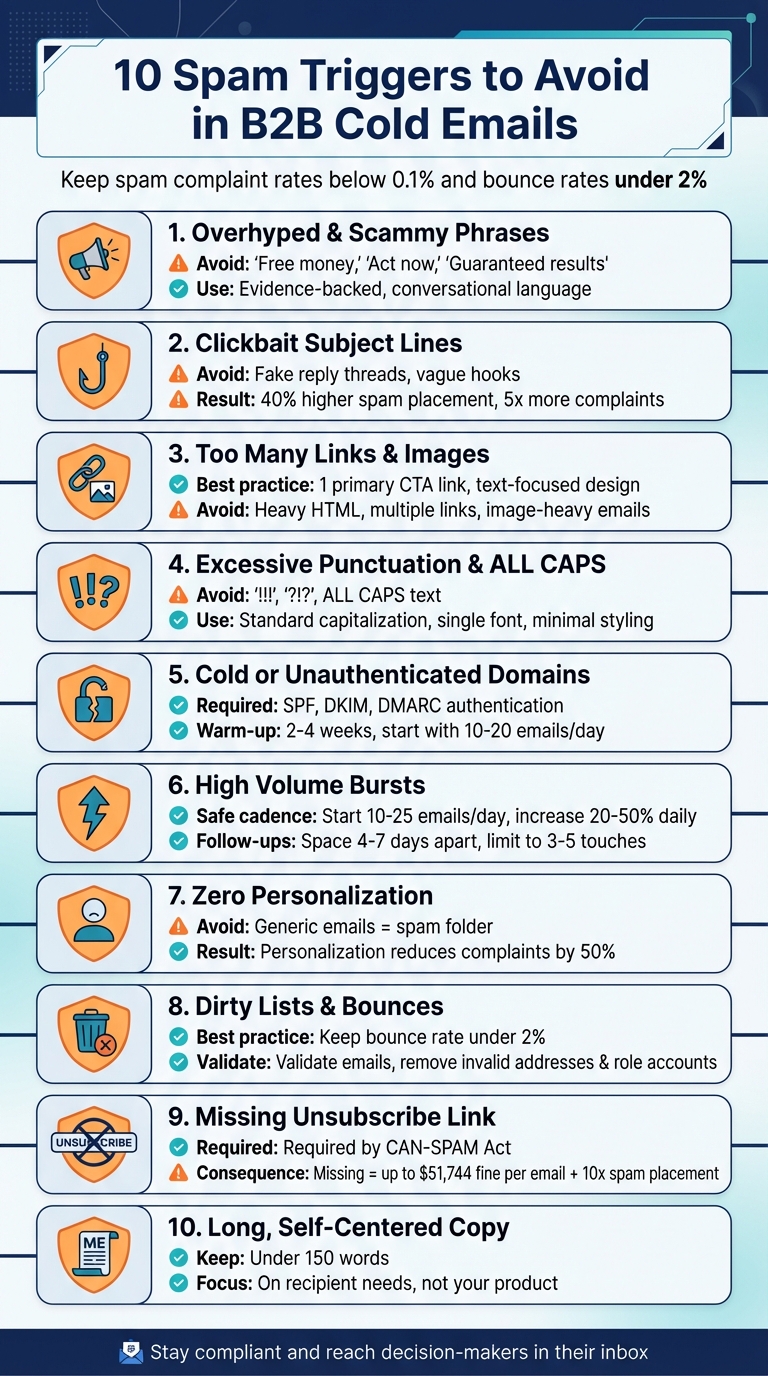
Even a 0.1% spam complaint rate or bounce rates over 2% can harm your domain. Tools like Salesforge can help automate warm-up, validate emails, and craft personalized messages to stay out of spam folders.
Miss these basics, and your emails won’t stand a chance. Nail them, and you’ll reach decision-makers where it matters: their inbox.
10 Spam Triggers to Avoid in B2B Cold Emails
1. Overhyped and Scammy Phrases
Certain words and phrases can immediately flag your email as spam, both by automated filters and by the people reading them. Terms like "free money", "act now", "limited time offer", "guaranteed results", and "once-in-a-lifetime opportunity" are classic examples. These phrases often resemble the language used in scams or low-value promotions, which is why email providers like Gmail and Yahoo are programmed to detect and block them.
But the issue goes beyond just the technical side. Over-the-top language can also lead to human spam complaints, which are one of the most harmful signals for your email reputation. Providers like Gmail and Yahoo require spam complaint rates to stay below 0.1% - that’s fewer than 1 complaint per 1,000 emails. If your email comes across like a late-night infomercial ("Earn $ with no risk!" or "100% guaranteed to 10x your revenue"), recipients are more likely to hit the spam button, damaging your sender reputation.
In B2B outreach, professional buyers expect meaningful, business-focused conversations - not flashy sales pitches. Instead of using phrases like "Act now before it's gone", try something more specific and relevant, such as: "If this aligns with your Q1 planning, I’d be happy to provide a 10-minute overview next week." Replace "Guaranteed results" with something grounded in data, like: "A peer in your industry saw a 12% increase over 90 days." Shifting from hype to conversational, evidence-backed language makes your email feel more like a genuine offer to help rather than a generic promotion.
Modern spam filters rely heavily on machine learning and recipient engagement metrics, meaning it’s not just about avoiding a few "bad words." The overall tone of your email matters. Combining multiple spam triggers - like urgency, exaggerated benefits, and financial promises - will almost guarantee your email gets flagged. For example, "Act now to earn $10,000/month with no experience" is a perfect storm of spam signals. On the other hand, emails that use a conversational tone and focus on personalization are much more likely to succeed.
Salesforge's AI technology helps personalize email content at scale, steering clear of generic hype while maintaining a human touch. The goal is simple: write like one person reaching out to another, not like a mass promotion trying to create urgency out of thin air.
2. Clickbait or Misleading Subject Lines
Using deceptive subject lines is a surefire way to harm your sender reputation and land in spam folders. When your subject line promises one thing but delivers something entirely different, recipients feel misled - and often retaliate by marking your email as spam. This isn't just about keeping people happy; it's also about staying compliant with legal and technical standards.
For starters, U.S. CAN-SPAM law bans misleading subject lines, requiring that the subject accurately reflects the content of your email. On top of that, modern spam filters use machine learning to detect mismatches between subject lines and email bodies. If the filters flag a low relevance score, your email could be penalized. Research shows that emails with overly hyped subjects see 15–25% lower open rates and 40% higher spam placement. Worse, misleading subject lines can lead to spam complaints that are five times higher compared to straightforward messaging.
To avoid these traps, steer clear of common misleading tactics such as:
- Fake reply threads (e.g., "Re: Quick question" when no prior conversation exists)
- Over-the-top promises (e.g., "Double your revenue overnight" when offering a basic pitch)
- Vague hooks (e.g., "You'll want to see this" without delivering meaningful content)
These approaches often lead to complaints, low engagement, and deletions - all red flags for email providers.
Keep your subject lines clear and relevant to your email. For example, instead of a generic claim like "This will change everything for your business", try something more specific, such as "Reducing cloud spend for finance teams" or "Idea to shorten your sales cycle." Make sure the email content lives up to the subject line's promise. For instance, if your subject says, "Quick idea to cut churn at [Company]", your email should deliver actionable advice. Adding personalization - like the recipient's name, company, or a recent event - can also make your email feel more legitimate and reduce spam complaints by up to 50%.
Test your subject lines to see what works. Platforms like Salesforge let you A/B test subject lines while tracking open rates and spam scores using tools like Google Postmaster Tools. Aim for open rates between 20–40% and keep spam complaints below 0.1%. Use the data to tweak your approach and find what resonates with your audience. By prioritizing clear, honest subject lines that align with your email content, you'll build trust with recipients and email providers alike - keeping your messages out of spam folders in the long run.
3. Too Many Links, Images, and Heavy HTML
The way your email is designed plays a big role in whether it lands in an inbox or gets flagged as spam. Packing your emails with too many links, large images, or overly complicated HTML can quickly raise red flags with spam filters - especially if your domain reputation or email authentication isn’t strong. These filters analyze the structure of your email, looking at the balance between links and text, images and text, and HTML versus plain text. If your email doesn’t match the patterns of legitimate business communication, it’s more likely to be flagged.
Including multiple links in an email can be risky. Spam filters often associate excessive links with phishing attempts or low-quality content. The danger grows if your links lead to domains with weak reputations or rely on generic URL shorteners that obscure the destination. For B2B outreach, it’s better to stick to one primary call-to-action link and, if necessary, one secondary link - both from a verified, branded domain.
Using too many images or complex HTML can also hurt deliverability. Emails that are image-heavy or rely on intricate HTML designs can resemble bulk marketing campaigns, which may trigger spam filters or slow down load times. Instead, opt for simple layouts with minimal formatting and a single, clear link. Poorly coded templates with excessive formatting or unnecessary tracking code can make things worse, so it’s best to avoid them.
Focus on text-based emails that use short paragraphs, standard fonts, and minimal styling. Avoid flashy elements like colored backgrounds, multiple fonts, oversized logos, or multi-column layouts that mimic promotional newsletters. For professional one-to-one emails, a clean and straightforward signature with your name, title, company, and website link (plus a small logo, if needed) is more than enough.
Keeping your emails simple not only helps you avoid spam filters but also boosts response rates. Text-heavy emails often feel more personal and authentic, which leads to better engagement. When recipients open and respond to your messages, email providers see this as a sign of value, improving your chances of landing in the inbox for future campaigns.
Salesforge makes it easier to send AI-personalized, text-focused emails while handling validation, warmup, and multi-mailbox management for you.
4. Excessive Punctuation, All Caps, and Gimmicky Formatting
When it comes to avoiding spam triggers, the way your email looks is just as important as the words you use. Spam filters are designed to flag patterns commonly associated with low-quality or scammy content, and things like excessive punctuation, ALL CAPS, and over-the-top styling are major red flags. Think of phrases like "READ THIS NOW!!!" or "LAST CHANCE" - these are almost guaranteed to land your email in the spam folder.
Using multiple punctuation marks (like "!!!" or "?!?!") gives off a strong promotional vibe that spam filters are quick to catch. The same goes for writing in ALL CAPS - it comes across as shouting, which not only irritates readers but also increases the likelihood of them marking your email as spam.
Overly flashy formatting, such as colored fonts, oversized text, or heavy styling, can make your email look like a generic marketing blast. Spam filters also analyze the complexity of your email's HTML and inline styles. The more elaborate your formatting, the more likely it is to be flagged. Keeping your email clean and simple, much like limiting links and images, helps ensure it reaches the inbox.
The key is to write your email as if you were sending a professional work message. Stick to standard sentence capitalization, use a single font in black or dark gray, and avoid unnecessary exclamation marks altogether. If you need to highlight something important, a touch of bold text for a key number or call-to-action works well - but don’t overdo it.
If you're using AI tools or platforms like Salesforge to scale your outreach, make sure to configure templates and settings to align with these best practices. Avoid ALL CAPS, limit punctuation, and keep formatting simple and professional. This approach not only helps your email bypass spam filters but also builds trust and encourages better engagement.
5. Sending from Cold or Poorly Authenticated Domains
Launching email campaigns from a new or poorly authenticated domain is a quick way to get flagged by spam filters. Providers like Gmail and Outlook are cautious with new domains, considering them untrustworthy until they establish a track record of low spam complaints. Without proper authentication - SPF (Sender Policy Framework), DKIM (DomainKeys Identified Mail), and DMARC (Domain-based Message Authentication, Reporting & Conformance) - providers can’t confirm your identity. As a result, your emails might end up in the spam folder or get blocked entirely. These authentication protocols are the backbone of successful email outreach.
Here’s how they work together: SPF identifies which servers are allowed to send emails on behalf of your domain, DKIM ensures the email’s integrity by adding a cryptographic signature, and DMARC sets rules for handling messages that fail these checks. When all three are properly configured, your emails appear trustworthy and consistent - key factors for reaching inboxes. For B2B cold outreach, where unsolicited emails are sent in bulk, a lack of authentication combined with a new domain raises red flags and quickly triggers spam filters.
To avoid these pitfalls, warming up your domain is crucial. This process, which typically lasts 2–4 weeks, starts with sending a small number of emails - around 10–20 per day - to highly engaged recipients, such as team members or warm contacts. Gradually, you increase the volume each week (e.g., doubling or adding 10–20 emails per day), all while monitoring bounce rates, spam complaints, and inbox placement. During this phase, keep the email content simple - plain text with minimal links and images - to avoid triggering spam filters. Pairing a proper warm-up with authentication ensures your emails are more likely to land where they should: in inboxes.
Many B2B teams use subdomains (e.g., outreach.company.com) for cold email campaigns. This approach protects the reputation of the main domain, ensuring that critical emails, like invoices or customer support messages, remain unaffected if a cold outreach campaign encounters issues. However, even these subdomains require full SPF, DKIM, and DMARC setup, along with their own warm-up process. By isolating outreach domains, teams can safeguard core communications while managing cold email campaigns more effectively.
Tools like Salesforge's Warmforge simplify the warm-up process. They automate tasks like sending and receiving emails between real inboxes, opening and replying to messages, and gradually increasing email volume - all in line with best practices. Warmforge also offers unlimited email warm-up, making it easier to prepare new domains for large-scale campaigns. With features like email validation and centralized mailbox management, teams can streamline their warm-up, authentication, and sending strategies across multiple domains, ensuring healthier reputations over time.
6. High Volume Bursts and Aggressive Cadences
Sending a large volume of emails from a new domain can set off alarms with spam filters. Providers like Gmail and Outlook closely monitor for sudden spikes in email activity - especially if the domain lacks a solid sending history. If these patterns are flagged, your sender reputation might take a hit, or worse, your domain could end up blacklisted. Even a single spam report per 1,000 emails can harm your deliverability rates, and high-volume bursts only increase the risk of such reports.
The problem gets worse with frequent follow-ups. Sending emails every two days can feel overwhelming for recipients, particularly at small and medium-sized businesses where inboxes aren’t as crowded. This aggressive approach often leads to manual spam reports, further damaging your reputation.
To avoid these pitfalls, stick to a gradual and human-like sending cadence. Start small - send 10–25 emails per day per domain, and then increase your volume by 20–50% daily over the next 2–4 weeks. For instance, you could begin with 20 emails on Day 1, hit 100 by Day 7, and scale up to over 200 by the second week.
When it comes to follow-ups, give your recipients some breathing room. Space your emails 4–7 days apart (e.g., Day 1, Day 4, Day 10, Day 18) and limit your sequences to 3–5 total touches. Keep daily sends between 50–200 per warmed domain and aim to send emails during standard business hours (9:00 AM to 5:00 PM on weekdays). This approach not only respects your audience’s time but also aligns with B2B communication norms and technical best practices.
For those looking to streamline the process, automated tools can help manage volume increases and cadence adjustments. Platforms like Salesforge’s Warmforge handle these tasks seamlessly, offering unlimited email warm-up while monitoring mailbox health across multiple domains. Jake Kitchiner, Co-Founder of ChannelCrawler, shared his experience:
"We've run small campaigns to preserve our email infrastructure. The warm-up process, spintax, and inbox management are key winners."
7. Poor Targeting and Zero Personalization
Sending out generic emails is a fast track to the spam folder. Messages with vague openers like "I came across your website" scream "mass email", and most recipients won’t hesitate to delete them - or worse, mark them as spam. Email providers pay close attention to these signals, such as low open rates, quick deletions, and spam complaints. These behaviors can seriously harm your sender reputation, making it harder for future emails to even reach an inbox.
Here’s the kicker: just one spam complaint per 1,000 emails (0.1%) can hurt your deliverability. When you send out untargeted emails using generic templates, you’re practically inviting those complaints. Recipients who receive irrelevant emails - whether it’s because they’re in the wrong industry, have a different role, or the timing is off - are much more likely to hit "spam" than those who feel the message is meant for them.
The solution? Start by creating a detailed ideal customer profile (ICP) and segment your email lists based on factors like industry, company size, job role, or specific buying signals. But don’t stop there. Personalization needs to go beyond just slapping the recipient's first name into the email. Reference something meaningful - like a recent company announcement, a challenge specific to their role, or even a piece of content they’ve published. Showing that you’ve done your homework beats a one-size-fits-all approach every time.
This isn’t just theory; it works in practice. Take Carlos Palop Moliner, CEO of UniteSync, as an example. His team used Salesforge to target music creators with unclaimed royalties. By combining precise targeting with highly personalized messaging, they achieved an 85.26% positive reply rate and a $2.86 customer acquisition cost. Moliner explained:
"Our tech identifies music creators with unclaimed royalties. That's the core of our message - and it resonates, but cold emails succeed only when they resonate. That's where Salesforge and Mailforge have made the difference."
For teams working on a larger scale, AI-powered tools can help maintain that personal touch without sacrificing volume. Platforms like Salesforge offer AI-driven personalization that crafts tailored content for each lead. Meanwhile, tools like Agent Frank - an AI SDR - handle everything from prospecting to creating customized outreach across email and LinkedIn. AKOOL leveraged this approach to connect with over 214,000 prospects, achieving a 16%+ positive reply rate. This shows that scalable personalization isn’t just a nice-to-have - it’s essential for keeping your emails out of the spam folder.
8. Dirty Lists, Bounces, and Role Accounts
A "dirty" email list - packed with invalid addresses, spam traps, and generic role accounts like info@ or sales@ - can seriously hurt your sender reputation. When you send emails to addresses that don’t exist, providers like Gmail and Microsoft flag these hard bounces against your domain and IP. A high bounce rate sends a clear signal that you're working with poor-quality data or scraping addresses online - practices commonly linked to spammers. The outcome? Your emails could be throttled, sent straight to junk folders, or even blocked entirely, affecting even your valid contacts. This makes pre-send list cleaning a must, as outlined below.
Experts typically advise keeping your bounce rate under 2%. Anything higher can lead to immediate filtering or blacklisting by ISPs. Pair that with even a small number of spam complaints, and the damage escalates quickly. Sending emails to generic role accounts - often monitored by multiple people or tied to ticketing systems - worsens the problem. These emails are often ignored, deleted, or marked as spam, further harming your sender reputation.
To prevent these issues, validate every contact on your list. Ensure proper email formatting, check for valid MX records, and confirm active mailboxes. After each campaign, remove hard bounces and suppress contacts who haven’t engaged after a few touches. And steer clear of purchased or scraped lists - they’re often riddled with invalid addresses, spam traps, and role accounts that can quickly cripple your deliverability.
Automated tools can make this process easier. Salesforge, for instance, includes built-in email validation to identify and remove risky addresses before they’re added to your sequences. This reduces bounce rates and helps protect your domain reputation. With features like unlimited warm-up via Warmforge and centralized management of multiple mailboxes, the platform lets you scale your outbound efforts safely, ensuring you only reach verified, high-quality contacts while maintaining strong deliverability.
Here’s an example: A team sending 20,000 cold emails per month struggled with a 7% bounce rate, partly due to generic role addresses like info@ and sales@. By validating their list and removing invalid and role-based contacts, they reduced their volume to 16,000 emails. The results? Bounce rates dropped below 2%, open rates jumped from 35% to over 45%, and spam complaints decreased. This illustrates the tangible benefits of thorough list hygiene.
9. Missing Unsubscribe and Compliance Signals
Once you've tackled technical issues, it's time to ensure your emails follow legal guidelines - starting with a clear unsubscribe option. Forgetting to include an unsubscribe link or a valid postal address in your B2B cold emails isn’t just unprofessional - it’s illegal under the CAN-SPAM Act. U.S. law mandates that every commercial email must have a one-click unsubscribe option and a valid physical postal address (this can be a street address, PO Box, or registered agent). Neglecting these requirements could lead to hefty fines - up to $51,744 per email, according to the FTC. Beyond the legal risks, email providers like Gmail and Outlook are quick to flag non-compliant emails as spam, associating them with fraudulent activities.
The consequences for your email deliverability can be devastating. Leaving out an unsubscribe option can increase spam placements by as much as tenfold. Campaigns that meet compliance standards consistently achieve better inbox rates. When recipients can’t easily opt out, they’re more likely to hit "Report spam." Even a low complaint rate - just one spam report per 1,000 emails (0.1%) - can harm your sender reputation and throttle future campaigns. Email providers also monitor how often users click unsubscribe links versus reporting emails as spam. Missing opt-out options pushes your complaint rates into dangerous territory.
Ensuring compliance is simple. Add a one-click unsubscribe link and your full mailing address in the email footer. For example, use a format like: "Salesforge Inc., 123 Main St, San Francisco, CA 94105." Process opt-out requests within 10 business days, and make sure the unsubscribe process is straightforward, with no fees or extra steps beyond providing an email address.
If you’re using a cold email platform, take advantage of its compliance tools. Salesforge, for instance, automatically adds unsubscribe links and manages global suppression lists, ensuring opted-out contacts are never emailed again. Paired with features like email validation and automated warm-up through Warmforge, these tools help you scale your outreach while staying compliant. Regularly test your email templates by sending them to accounts on Gmail, Outlook, and corporate domains to confirm that your unsubscribe link is visible and functional.
Finally, include a signature block with your full name, title, company, and website to establish credibility. Some teams also add a friendly opt-out message in the email body, like: "Not interested? Feel free to let me know, and I’ll close the loop." This approach not only reduces spam complaints but also signals to email filters that you’re a legitimate sender who respects recipient preferences.
10. Overly Long, Self-Centered, or Hard-Sell Copy
Even the most technically accurate email won't escape the spam folder if it comes across as overly salesy. Long emails that focus too much on your product instead of the recipient's needs feel like generic marketing blasts. U.S. decision-makers, often checking emails on their phones, are scanning for messages that align with their priorities - not your sales pitch. Starting an email with paragraphs about your funding milestones or product features makes readers work to figure out, "What's in it for me?" This often leads to a quick delete or, worse, a spam report.
When your copy is self-centered, it can result in poor open rates, minimal replies, and a higher chance of being flagged as spam. Even a single spam complaint per 1,000 emails (0.1%) can harm your sender reputation. If your email feels more like a hard sell than a conversation, prospects are likely to treat it as unwanted advertising. To avoid this, brevity and personalization are key.
To boost responses, every word of your email should speak to the recipient's needs. Keep your cold emails short - under 150 words - and divide them into 3–5 concise paragraphs for easy readability. A simple structure works best:
- Start with 1–2 lines of personalized context related to the recipient's role or company.
- Follow with 1–2 lines framing a problem in terms they can relate to.
- Add 1–2 lines of social proof to build trust.
- End with a low-pressure call to action, like "Worth a quick look?"
Always use natural, conversational language that emphasizes "you" instead of "we."
Just as precise technical practices ensure email deliverability, concise and personalized messaging keeps recipients engaged. Tools like Salesforge's AI personalization and Agent Frank make it easier to craft short, tailored emails at scale. When paired with email validation and automated warm-up strategies, these tools help maintain a conversational tone while reducing spam complaints.
Avoid using pushy, ultimatum-style language that pressures readers. Instead, opt for soft, permission-based calls to action, such as "Open to a quick comparison?" or "Does this sound relevant?" When your email feels like a genuine conversation rather than a sales pitch, you're more likely to see higher reply rates, fewer spam complaints, and better inbox placement over time.
Conclusion
Keeping your emails out of spam folders is crucial for maintaining access to decision-makers. When messages end up in spam, your entire cold outreach effort can crumble. Triggers like exaggerated language, misleading subject lines, poor domain authentication, or overly aggressive sending habits can harm your sender reputation and lower open rates. Even a single spam complaint per 1,000 emails or a bounce rate above 2% can hurt deliverability or even get you blacklisted.
The good news? These problems are avoidable. To protect your outreach, take these steps: authenticate your domains with SPF, DKIM, and DMARC; gradually warm up new mailboxes over at least two weeks; write short, personalized, and conversational emails; validate your email lists; and always include a clear unsubscribe option. For example, UniteSync achieved an 85.26% positive reply rate and a $2.86 customer acquisition cost by focusing on deliverability basics. Similarly, ChannelCrawler reached an 85.71% positive reply rate by prioritizing proper warm-up routines, inbox management, and personalization.
If you're managing large-scale B2B outreach, handling these tasks manually can be overwhelming. Tools like Salesforge simplify the process by automating personalization, warming up domains with Warmforge, validating emails, and managing multiple mailboxes. Salesforge’s AI SDR, Agent Frank, handles everything from lead generation to follow-ups and meeting scheduling, ensuring your outreach stays within safe deliverability limits. With automation, your team can focus on refining strategies to improve results.
FAQs
What are the top spam triggers to avoid in B2B cold emails?
When it comes to B2B cold emails, certain missteps can often trigger spam filters. Common culprits include using overly promotional phrases like "guaranteed", "free", or "limited time offer", which can come across as too pushy. Then there’s poor formatting - think excessive capitalization or an overload of exclamation marks - that can make your email look unprofessional. Lastly, technical issues like missing or incorrect email authentication settings (such as SPF or DKIM records) can also hurt your email's chances of reaching the inbox.
These mistakes can seriously impact your deliverability, pushing your carefully crafted emails straight into spam folders. To avoid this, focus on writing professional, tailored messages that feel genuine. At the same time, make sure your technical setup is properly configured to support your outreach efforts. A little attention to detail can go a long way in improving your success rate.
How do I authenticate my email domain to improve deliverability?
To ensure your email domain is verified and your messages are delivered reliably, it's crucial to set up SPF, DKIM, and DMARC records in your DNS settings. These protocols act as a security trio, confirming your identity as the sender, minimizing the chances of your emails being marked as spam, and shielding your domain from spoofing attempts.
It's important to configure each record accurately and keep an eye on them regularly to maintain strong email performance. This not only strengthens your reputation as a sender but also helps your emails land in your recipients' inboxes where they belong.
How can I improve email deliverability and prevent my messages from going to spam?
To make sure your emails reach inboxes and avoid the dreaded spam folder, start by building a strong sender reputation. A tool like Warmforge can help you gradually warm up your email account, which is essential for establishing trust with email providers. Also, steer clear of spammy language, over-the-top formatting, or misleading subject lines that could trigger spam filters.
Another key step? Validate your email list. By confirming that you're only reaching out to active and valid email addresses, and regularly cleaning up your contact list, you can maintain a healthy engagement rate and avoid unnecessary bounces.
For even better results, consider using platforms like Salesforge. With features like AI-driven personalization, automated follow-ups, and reply management tools, these platforms make it easier to optimize your campaigns while keeping deliverability rates high. By sticking to these strategies, you'll increase the chances of your emails landing where they belong - in your recipients' inboxes.